Batch up to 2,000 files in one go
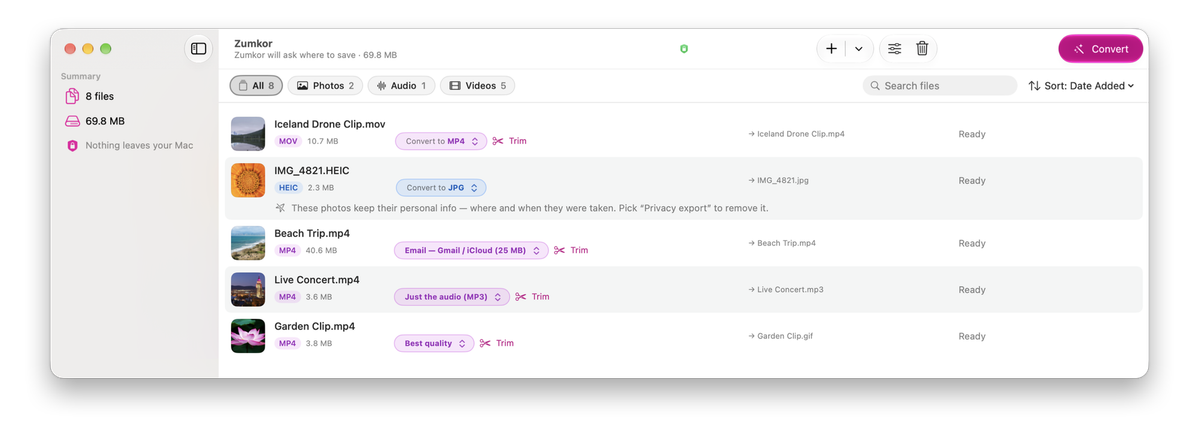
Drop a whole folder — a camera roll of photos or a season of videos. Zumkor converts every file at once and drops the results into the folder you choose — it remembers your pick, and your originals stay put.
Zumkor is a Mac app that turns HEIC into JPG, MKV into MP4, RAW into TIFF, and video into MP3 or GIF — a whole folder at a time. Everything runs on your Mac. Nothing is uploaded. Buy once, keep it forever.
Converts in every direction — a handful of the hundreds of combinations:
What Zumkor does
Built for the everyday moment when a file is the wrong type, the wrong size, or won't open — and you just need it fixed, without uploading it to a stranger's server.
Drop a whole folder — a camera roll of photos or a season of videos. Zumkor converts every file at once and drops the results into the folder you choose — it remembers your pick, and your originals stay put.
Your files are never uploaded — nothing ever leaves your Mac. Convert on a plane with Wi-Fi off and it works exactly the same. Private by default.
Need captions? Zumkor listens to your video and writes the subtitles for you — right on your Mac, on macOS 26 and up (the first time, your Mac downloads Apple’s speech files).
Too big for Gmail, WhatsApp, Discord, or Notion? Pick where it’s going and Zumkor shrinks the video to fit — or tells you if it can’t. Photos resize for email or the web. No bitrate math, no codec menus to learn.
Only need a piece of a video? Trim it before you convert — no separate editor needed.
Remove GPS location and device info from photos before you send them. It is one click, and it is always your choice — never automatic, never silent.
Whatever you're trying to do
No codec knowledge required. If you can say what you want the file to become, Zumkor can do it — usually in a single batch.
Got iPhone photos someone needs as JPGs? Turn hundreds of HEIC files into JPG in a single batch.
A video that won’t play — MKV, WebM, AVI, old camcorder .MTS or DVD .VOB files? Make it an MP4 that plays anywhere.
Just need the sound? Extract the audio from any video, or convert it to a plain, normal MP3.
Recorded your screen? Turn it into a GIF for Slack, Linear, or GitHub — sized to actually upload.
Photographer? Convert Canon, Nikon, and Sony RAW files to JPG or TIFF in one batch.
Convert SRT to VTT, or pull the subtitles straight out of a video file.
Found the conversion you need? Free for 7 days, then 5 files a day free — or one-time $19.99 for everything. Batch your first folder in the next minute.
Download on the Mac App Store Zumkor — free downloadGuides
Walkthroughs for the conversions people bring to Zumkor: the free built-in route on your Mac, and the one-batch route.
HEIC photo won't open? Convert HEIC to JPG on your Mac with Finder, Preview, Photos or Terminal, all free and built in, or batch whole folders with Zumkor. No upload.
Convert MOV videos to MP4 on your Mac with iMovie, ffmpeg, or Zumkor. Includes the lossless stream-copy trick that remuxes in seconds with zero quality loss.
Convert MP4 to MP3 on your Mac — or stream-copy the audio losslessly to M4A. QuickTime, ffmpeg, and Zumkor routes compared, batch-friendly and fully offline.
Video too big to email? Shrink it on your Mac to fit Gmail's 25 MB or Outlook's 20 MB limit with QuickTime, ffmpeg, or Zumkor, which sizes it for you. Offline, no upload.
Turn an MP4 into an animated GIF on your Mac with ffmpeg or Zumkor — trim to the moment, land under Discord's 256 KB autoplay cap or Notion's 5 MB, fully offline.
MKV won't open in QuickTime? Convert MKV to MP4 on your Mac without re-encoding: one ffmpeg command, or drag a folder into Zumkor. Plus the no-sound and subtitle fixes.
Convert camera RAW files — CR2, CR3, NEF, ARW, RAF, DNG — to JPG on your Mac with Preview, sips, or Zumkor. Batch whole shoots offline, nothing uploaded.
Photos carry GPS coordinates, timestamps, and device info. Remove EXIF data from photos on Mac with Preview, exiftool, or Zumkor's one-click batch strip — all offline.
Formats it handles
Open the long list on the left; save to any format on the right. Within each group, what Zumkor opens converts to what it writes — except that camera RAW saves to JPG or TIFF and camcorder and DVD footage becomes MP4 — and formats on both sides (JPG, PNG, MP4, MP3, MKV…) go either way, so it's HEIC → JPG and JPG → HEIC.
Opens
HEIC, JPG, PNG, TIFF, WebP, AVIF, GIF, BMP, camera RAW (Canon, Sony, Nikon, Fuji, and more)
Saves to
Opens
MP3, M4A (AAC), WAV, AIFF, FLAC, OGG, Opus, WMA
Saves to
Opens
MP4, MOV, M4V, MKV, WebM, AVI, WMV, FLV, 3GP, AV1 — plus AVCHD camcorder (.MTS, .M2TS), .TS, and DVD (.VOB) files, which convert to MP4
Saves to
Opens
Any video’s embedded text-subtitle track, SRT, VTT
Saves to
Mac-native
Zumkor is a real Mac app, built for Apple silicon — not a web page in a wrapper. Every conversion happens locally, so your photos, recordings, and RAW files never touch a server. Bring pictures in straight from your Photos library, and automate conversions with Shortcuts — without even opening the app.
Pricing
Use everything free for 7 days. After that, keep converting 5 files a day (25 a week) for free — free videos get a small Zumkor mark — or unlock everything with a single purchase your whole family can share. No subscription, no renewals, no per-file limits.
Buy once, keep it forever. No subscription.
One Mac app for every photo, audio, and video format — offline, in bulk, and yours for a single price. Download Zumkor free, use everything for 7 days, and convert your first folder in the next minute.